Welcome to the new North Marion School District online parent payment website!
You can now make your student activities, donations and other payments on our site!
You can view your student's open fees and fines on our site! Real time.
Also, you can view your student's payment (receipts) ledger here too!
Thank you for supporting North Marion School District!
Parents/Guardians
You can now pay school fees in either of two ways, choose which method works best for you.
Option 1: Pay directly through TouchBase (original method) go to North Marion TouchBase and pay as you always have, no Powerschool account is needed. The username is the student's student ID and the password is the student's last name with the first letter capitalized
Option 2: Pay through PowerSchool (new option). If you have a PowerSchool Parent Portal account, you can now also reach TouchBase by signing into PowerSchool. This option must be done in a web browser, such as Chrome, Firefox, Edge or Safari, it is not available in the PowerSchool Mobile App.
If you don't have a PowerSchool Parent Portal account and would like one, Please contact your School Office and they can help you get one set up.
 |
- Sign into PowerSchool.
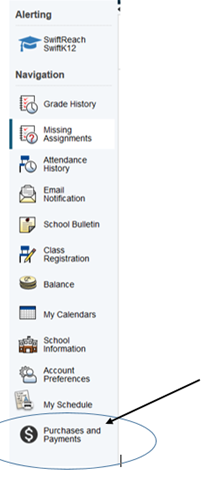
- Once signed in, click the icon in the left panel labeled Purchases and Payments (see image on left).
- This cannot be done from the PowerSchool Mobile app.
You will immediately be taken to TouchBase without having to sign in...
|
Parents/Guardians: Sign in here if you do not have a PowerSchool Account
1st Time Guests
A guest account allows you to make purchases unassociated with a parent/student account.
Do not use a guest account if you have a student in North Marion School District.
Create a Non-Parent Guest Account
Note: A guest account can never be attached to a student